
Condition Guidelines
Grading raw cards is subjective. Two sellers can look at the same card and call it different things. That inconsistency costs you — either in returns from over-grading or lost sales from under-grading. CardLuma puts eBay’s condition definitions right where you need them.
Reference at Your Fingertips
Click the info icon next to the Condition selector and the full grading reference appears instantly. Near Mint, Excellent, Very Good, Poor — each with clear descriptions of what to look for.
No switching tabs to look up eBay’s condition definitions. No second-guessing whether “fuzzy corners” means Excellent or Very Good. The answer is right there while you’re holding the card.
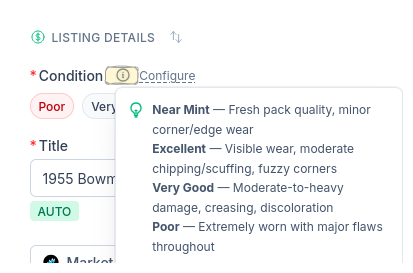
Built-In Reference
eBay condition definitions right in the card editor. No tab-switching, no Googling.
Consistent Grading
Same standard applied to every card. Fewer returns from over-grading, fewer missed sales from under-grading.
One-Click Access
Click the info icon next to Condition. That’s it. Guidelines appear right where you’re already working.
Ready to List Smarter?
Start scanning and listing cards in minutes. No credit card required.
Sign Up for Your Free Trial